> ## Documentation Index
> Fetch the complete documentation index at: https://developer.me-cash.com/llms.txt
> Use this file to discover all available pages before exploring further.

# Generate API Keys

> Step-by-step guide to generating and managing sandbox and production API keys in the meCash dashboard.

After KYB approval, you can create API keys from the developer dashboard. The flow below guides you through generating a new key and removing one you no longer need.

## Generate a new API key

<AccordionGroup>
  <Accordion icon="compass-drafting" title="1. Open the Developers section">
    <Frame>
      <img src="https://mintcdn.com/mecash-0665cec5/YwWwP-Aa6_SDT7kC/public/images/Screenshot100106.png?fit=max&auto=format&n=YwWwP-Aa6_SDT7kC&q=85&s=eef08b7a661ee9074c175c09d10e992c" alt="Developer section highlighted in the meCash dashboard navigation" style={{ borderRadius: '0.75rem' }} width="1440" height="507" data-path="public/images/Screenshot100106.png" />
    </Frame>

    From the sidebar of your meCash dashboard, select **Developers** to manage API access.
  </Accordion>

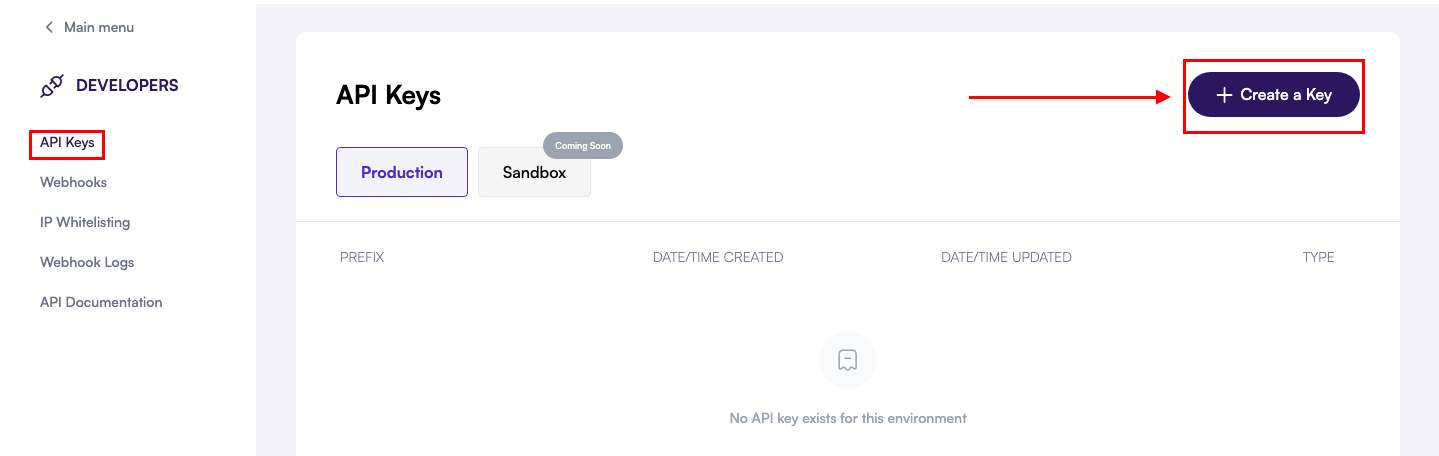
  <Accordion icon="key" title="2. Create a sandbox API key">
    <Frame>
      <img src="https://mintcdn.com/mecash-0665cec5/YwWwP-Aa6_SDT7kC/public/images/api-key-1.png?fit=max&auto=format&n=YwWwP-Aa6_SDT7kC&q=85&s=dfc091e6a54ad4f3c88ee1d21de255dd" alt="API Keys panel showing the Create a Key button" style={{ borderRadius: '0.75rem' }} width="1439" height="456" data-path="public/images/api-key-1.png" />
    </Frame>

    In the **API Keys** tab, click **Create a Key**. Choose the environment (Sandbox or Production) that matches your workflow.
  </Accordion>

  <Accordion icon="copy" title="3. Copy and secure the generated key">
    <Frame>
      <img src="https://mintcdn.com/mecash-0665cec5/YwWwP-Aa6_SDT7kC/public/images/Screenshot084315.png?fit=max&auto=format&n=YwWwP-Aa6_SDT7kC&q=85&s=79ef9c77e9b656ab45416c9a53c14326" alt="Modal displaying a newly generated API key with copy options" style={{ borderRadius: '0.75rem' }} width="1440" height="724" data-path="public/images/Screenshot084315.png" />
    </Frame>

    Copy the key immediately and store it somewhere safe—this is the only time it will be fully visible.
  </Accordion>
</AccordionGroup>

<Warning>
  Treat API keys like passwords. Never embed them in client-side code or commit them to version control.
</Warning>

## Delete an API key

<AccordionGroup>
  <Accordion icon="list-check" title="1. Navigate to API Keys">
    <Frame>
      <img src="https://mintcdn.com/mecash-0665cec5/YwWwP-Aa6_SDT7kC/public/images/Screenshot100106.png?fit=max&auto=format&n=YwWwP-Aa6_SDT7kC&q=85&s=eef08b7a661ee9074c175c09d10e992c" alt="Developers section selected in the dashboard navigation" style={{ borderRadius: '0.75rem' }} width="1440" height="507" data-path="public/images/Screenshot100106.png" />
    </Frame>

    Log in, open **Developers**, and choose **API Keys** to review existing credentials.
  </Accordion>

  <Accordion icon="trash" title="2. Select the key to remove">
    <Frame>
      <img src="https://mintcdn.com/mecash-0665cec5/YwWwP-Aa6_SDT7kC/public/images/Screenshot091543.png?fit=max&auto=format&n=YwWwP-Aa6_SDT7kC&q=85&s=1c8541632bc06495be59698413cde93c" alt="API key list with the Delete API Key button highlighted in red" style={{ borderRadius: '0.75rem' }} width="1431" height="697" data-path="public/images/Screenshot091543.png" />
    </Frame>

    Locate the key you want to revoke and click **Delete API Key**.
  </Accordion>

  <Accordion icon="shield-halved" title="3. Confirm deletion with OTP">
    <Frame>
      <img src="https://mintcdn.com/mecash-0665cec5/YwWwP-Aa6_SDT7kC/public/images/Screenshot091600.png?fit=max&auto=format&n=YwWwP-Aa6_SDT7kC&q=85&s=375b375e8111d0101bd6fb9c73a1db3a" alt="Confirmation modal asking to delete the API key" style={{ borderRadius: '0.75rem' }} width="1412" height="705" data-path="public/images/Screenshot091600.png" />
    </Frame>

    Confirm the action. You will receive a one-time password (OTP) via your registered email.
  </Accordion>

  <Accordion icon="lock-open" title="4. Enter OTP to finalize">
    <Frame>
      <img src="https://mintcdn.com/mecash-0665cec5/YwWwP-Aa6_SDT7kC/public/images/Screenshot091611.png?fit=max&auto=format&n=YwWwP-Aa6_SDT7kC&q=85&s=6df85794b311356eca0acbb7886c5106" alt="OTP verification step to confirm API key deletion" style={{ borderRadius: '0.75rem' }} width="1401" height="797" data-path="public/images/Screenshot091611.png" />
    </Frame>

    Input the OTP and click **Continue**. The key is permanently removed once verification succeeds.
  </Accordion>
</AccordionGroup>

<Note>
  Need a fresh credential? Repeat the **Generate a new API key** steps above at any time.
</Note>
