

Overview
When you deposit crypto to your meCash wallet, you receive a unique wallet address specific to your account and the selected network. You can send supported assets (like USDC, USDT, or Ether) from any compatible wallet or exchange to this address, and the funds will be credited to your meCash balance once confirmed on the blockchain.Important: Only send supported assets to the provided address. Sending unsupported assets or using the wrong network will result in permanent loss of funds.
How to Deposit Crypto
Log in to your meCash Business Dashboard and navigate to Ramp → Balances in the left sidebar.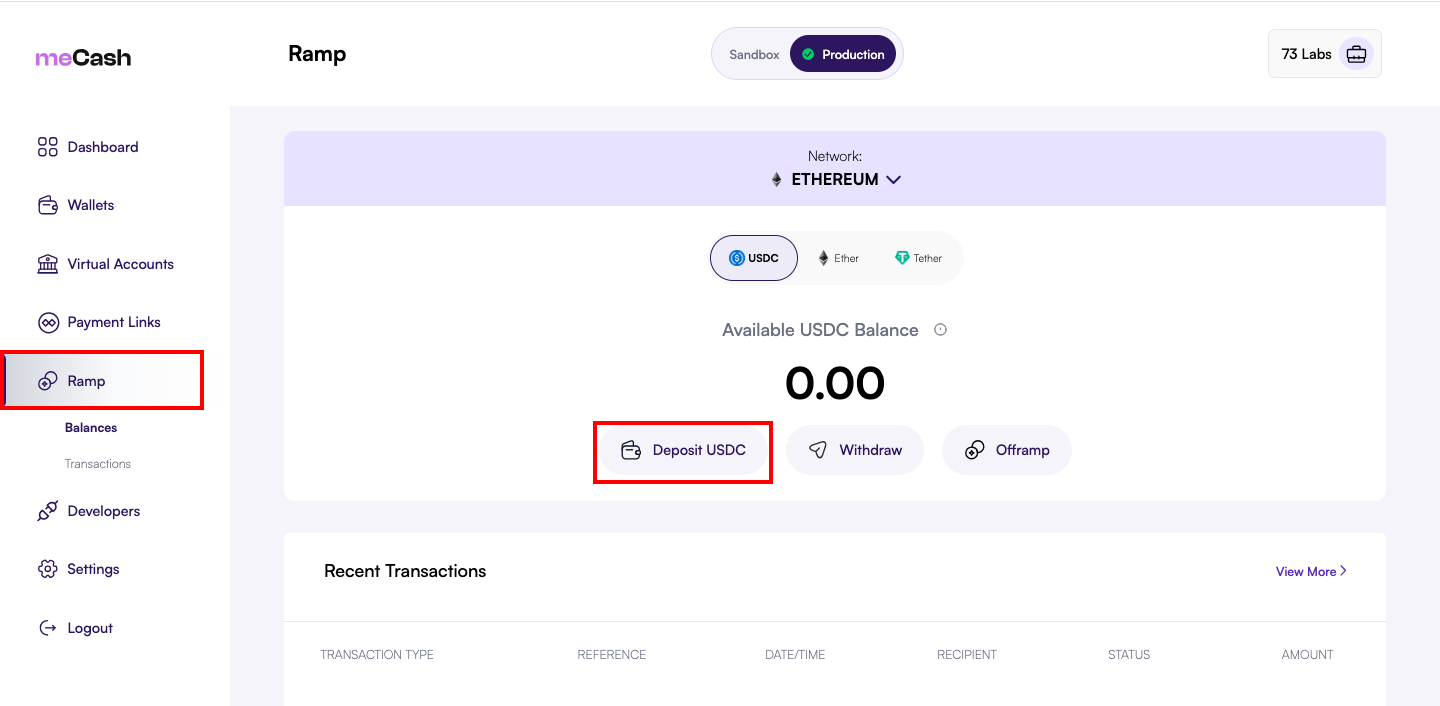
2. Select Network and Asset
2. Select Network and Asset
Choose your preferred network (e.g., Ethereum) from the network dropdown, then select the asset (e.g., USDC, USDT, or Ether) from the asset tabs.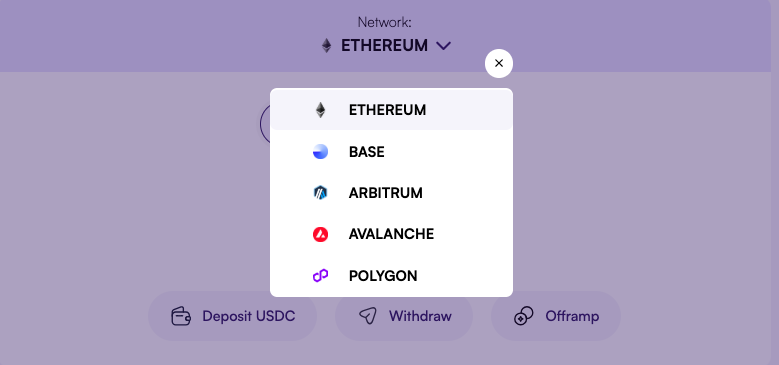
3. Click Deposit
3. Click Deposit
Click the Deposit button to open the deposit modal for the selected asset.
4. Copy Wallet Address or Scan QR Code
4. Copy Wallet Address or Scan QR Code
You’ll see: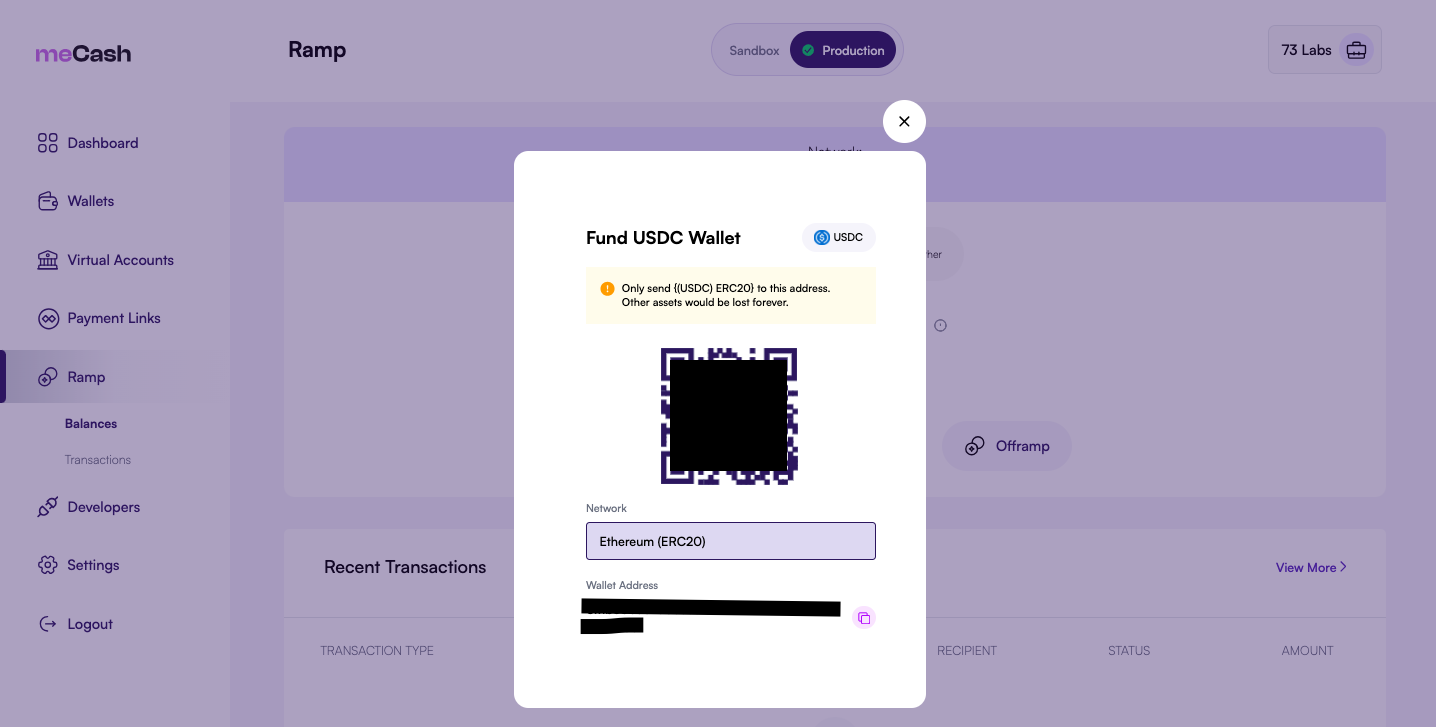
- A QR code that you can scan with your mobile wallet
- Your unique wallet address that you can copy and paste
5. Send Crypto
5. Send Crypto
From your external wallet or exchange, send the selected asset to the displayed address. Ensure you select the correct network (e.g., Ethereum ERC20).
6. Wait for Confirmation
6. Wait for Confirmation
Your deposit will appear in your balance once confirmed on the blockchain. This typically takes 2-5 minutes depending on network congestion.
Deposit Information
Wallet Address Format
Your meCash wallet address follows the standard Ethereum address format:Your wallet address is unique to your account and remains the same for all deposits on the selected network.
Supported Assets & Networks
Deposit Modal Details
When you click Deposit, a modal appears with the following information:Before You Deposit
Verify the Network
Verify the Network
Ensure you’re sending your asset on the same network displayed in the deposit modal. For example, if the modal shows “Ethereum (ERC20)”, send via the Ethereum network.
Double-Check the Address
Double-Check the Address
Always verify the wallet address before sending. Copy the address directly from the meCash dashboard rather than typing it manually.
Account for Gas Fees
Account for Gas Fees
When sending from an external wallet, ensure you have enough ETH (or native network token) to cover the gas fees for the transaction.
Minimum Deposit Amount
Minimum Deposit Amount
There is no minimum deposit amount, but very small deposits may not be cost-effective due to gas fees.
Tracking Your Deposit
In the Dashboard
After initiating a deposit:- Check the Recent Transactions section
- Your deposit will appear with status
PENDINGuntil confirmed - Once confirmed, the status changes to
COMPLETEDand your balance updates
Transaction Details
Each deposit transaction shows:Common Issues
Deposit Not Showing
Deposit Not Showing
Possible causes:
- Transaction is still pending on the blockchain
- Wrong network used (e.g., sent on Polygon instead of Ethereum)
- Insufficient gas on the sending wallet
Sent Wrong Asset
Sent Wrong Asset
If you sent an unsupported token to your deposit address, please contact support@me-cash.com immediately. Recovery may not always be possible.
Sent on Wrong Network
Sent on Wrong Network
If you sent crypto on an unsupported network, the funds may be lost. Contact support with your transaction details for assistance.
Security Best Practices
Verify Address
Always copy the address from meCash - never type it manually
Test First
Send a small test amount before making large deposits
Check Network
Confirm you’re using the correct blockchain network
Bookmark Dashboard
Access meCash through bookmarks to avoid phishing sites
After Depositing
Once your crypto is deposited, you can:- Withdraw: Send assets to any external wallet
- Offramp: Convert crypto to fiat currency (NGN, USD, etc.)
- Hold: Keep your balance in your meCash wallet for future use
Need Help?
If you encounter any issues with your deposit:- Email: support@me-cash.com
- Discord: Join our community